Beacon: Internal Teams
Scaling Beacon by fixing the internal structure of our customer organizations


Role
Product Designer
Team
Product (3)
Engineering (4)
Date
2023
Overview
Beacon is an aviation maintenance coordination and communication web app. Think of it as a "Slack + Ticketing System" for aviation professionals: it tracks aircraft repairs and improves communication to get planes back in service faster.
As the platform scaled, Beacon’s internal structure of customer organizations didn’t. I led the information architecture redesign of how Beacon models customer teams.
Beacon’s platform now accurately reflects how our customer organizations are structured, which re-enabled team-based case assignments, and thereby gave Admins more control to manage their teams without Beacon’s help.
Background
TLDR: As the product scaled, the internal structure ofr our customer organizations didn't.
To give context, Beacon has a centralized dashboard for users to create, track, and collaborate on repair cases to fix planes more efficiently.
“I want to have all our parts requests visible in one place”
“TRAX users need to open case by case to check parts status”
“Parts requests that were ordered to attend a specific case and join the stock, are not reserved for that case, being available to any other event, making it very difficult”
Originally, Beacon set up each customer team (like Technic or Atavis) as a separate organization to distinguish between Airline (case creators) and Maintenance (case workers) roles.
The disjointed process and customer data show there is:
-
Inefficient communication between maintenance teams, delaying repairs
-
Lack of visibility into pending and available parts
-
Difficulty in tracking orders, leading to confusion about delivery timelines
While this worked early on, it created friction over time: longer support setups, complex org configurations, and inconsistent workflows.
After our backend update allowed organizations to have multiple roles (Airline and Maintenance), we saw a chance to fix those inefficiencies.
Problem
Beacon’s original workaround, setting up each customer team as a separate organization, enabled case assignments but didn’t scale. It made team structures harder to manage, case assignment workflows more fragmented, and support processes more manual.
With the new backend update allowing multiple roles per one organization, we needed a scalable solution that re-enabled team-based assignments and reflected how our customers actually operate, while giving Admins more flexibility to manage their teams.
Ideations & Testing
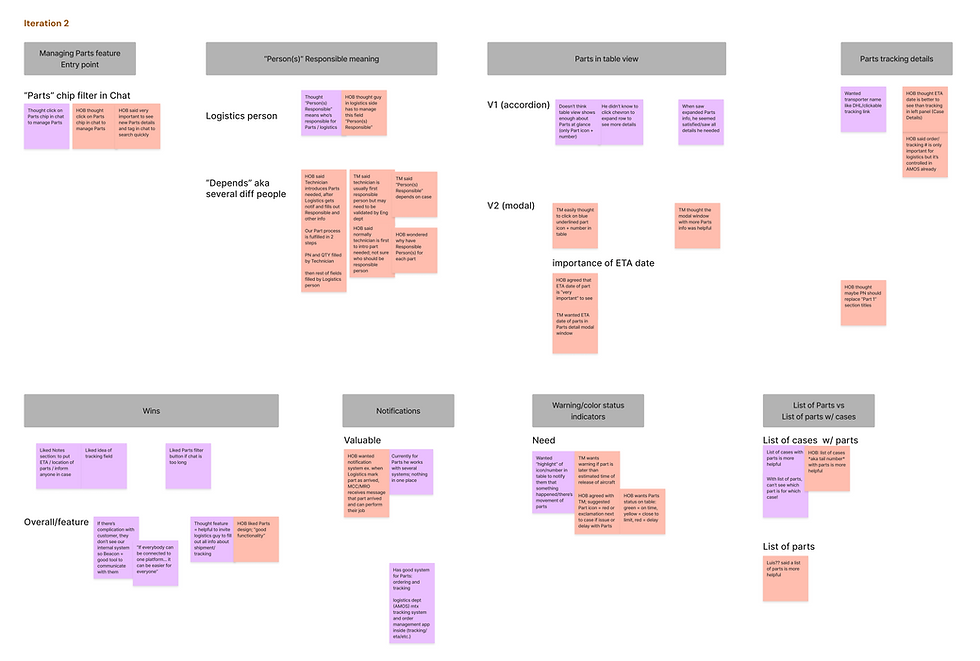
I ideated solutions for visibility and management of parts requests and then narrowed down the best solutions through collaborative sessions with our Eng and Product teams. With those designs, I conducted four internal sales sessions and usability testing sessions with users and affinity mapped my findings.

Improvements
After many meetings with Product, Eng, and Design teams and user testing we made significant changes and improvements. Some key improvements I made were:
-
Urgency prioritization thru color coded part status chips
-
Clearer timelines thru ETA detail added to part information
-
Future information architecture thru restructuring where parts feature lives
1. Urgency prioritization
I improved parts order status chips, especially "Pending" and "Delayed," through brighter orange and red colors that match users' mental models for warning/danger so they will have an easier time understanding which parts order needs attention ASAP.

BEFORE

BEFORE

AFTER
2. Clearer timelines
Added ETA date to part information so users can better plan/adjust timelines and resources accordingly.

BEFORE

AFTER
3. Better information architecture (for future)
For a future release, I moved management of parts info under “Manage” button since info under Pencil edit icon is about editing general details about the case. Parts feature doesn’t fit well there in terms of IA. The Parts feature has more details involved so decided to move it to “Manage” area where users can manage people, parts, and GSE.

BEFORE

AFTER

AFTER
Results
Beacon successfully launched the first release of the Parts feature, allowing users to manage and track parts requests more efficiently.
Check it out below!
Visibility

Management

Reflection
Balancing Speed, Impact, and Feasibility
Delivering meaningful value in a first release while balancing design impact, engineering feasibility, and tight timelines is always a challenge. With a lean team of three designers and a packed roadmap, we often had to quickly shift focus - moving straight from this Parts Management feature to the next feature, Internal Teams, to support backend restructuring. Given more time and resources, I’d advocate for follow-ups with customers and closer collaboration with Product and the rest of the team to track adoption and refine usability.
Research Learnings
It was exciting to carry out user testing since I advocated for more user feedback! Although we were constrained by group calls, where hierarchical dynamics often prevented candid feedback, it was a great to involve customers earlier on in the design process. In future projects, I would work with Product and Sales to explain the importance of user research and best practices to secure buy-in for one-on-one user interviews, ensuring deeper insights into customer pain points.